



Take control of your job search — for free.
With our Google Sheets job application tracker, you can organize every step of your job hunt without needing fancy software. Track applications, set follow-up reminders, and see your progress at a glance, all in one place.
Want to boost your chances even more? Use our free BeamJobs tools to generate cover letters, build resumes, and get feedback that helps you stand out.
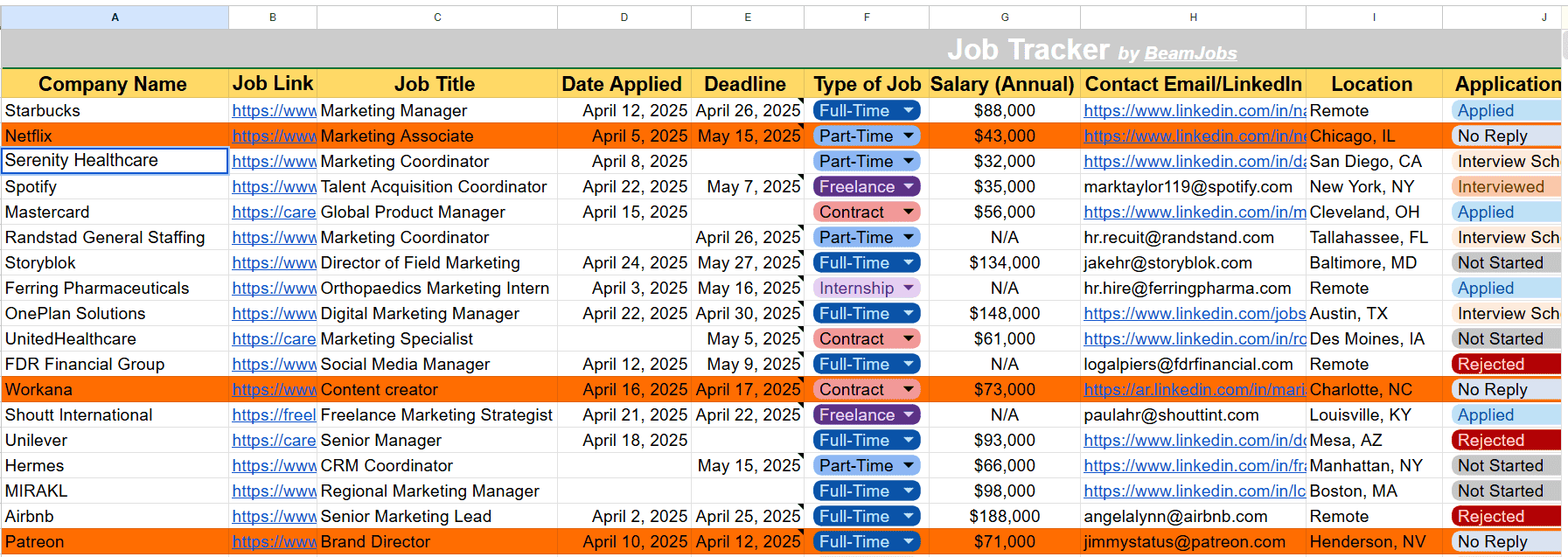
Here’s a quick view of a job tracker template that can revolutionize your job hunt:
Free Job Application Tracker Google Sheets Template

Google Sheets provides an efficient and accessible way for applicants to keep track of jobs they’ve applied for. You can download a free google sheets template and save it to your own google drive, making it easy to access, customize, and update your job application tracker whenever you need.
With built-in filtering and conditional formatting, you can easily monitor all your applications under one tab.

Why use a job application tracker in 2026?
Today, job hunting relies heavily on data. The hiring process has many steps, can take a long time, and often means managing several opportunities at once. Plus, not everyone can hire a personal assistant to track job applications.
If you don’t keep track of everything, you might:
- Miss important deadlines
- Forget which jobs you’ve applied to
- Overlook chances to follow up
The difference between a disorganized and an organized job search is significant. A tracker gives you more control over your applications, deadlines, and follow-ups, making your process more efficient and effective.
With a tracker, you can:
- Keep your job search organized
- Spot patterns in your applications
- Improve how and when you follow up
- Boost your chances of getting interviews

Why do you need a free Google Sheets job application tracker?
Here’s a quick list of all the pros of using Google Sheets for tracking jobs:
- Free: No subscriptions or charges. Open and start editing
- Customization: Add, edit, or remove any columns you wish
- Cloud-based: Access the document from any device using the same account
- Offline Mode: Enable the “Make available offline” option and edit without an internet connection
- Version History: Understand your progress over time and correct any typos or errors
Google Sheets and Excel both offer similar features for job application tracking, such as customizable columns and conditional formatting. This makes both tools a strong choice for organizing your job search.
While there are various benefits of using a Google Sheets-based job search template, the platform is also limited in usage. Here’s how:
- Not Mobile-friendly: Editing a sheet on mobile phones can be clunky
- Learning Curve: Filters and conditional formatting require time to learn
- Not Built for Job Tracking: Lacks resume building and analysis features
- Data Privacy: Be mindful of your share settings and mitigate personal data exposure
How do I create a Job Application Spreadsheet with Google Sheets?
Ready to build a job application tracker template in Google Sheets yourself? Follow the steps below to get started:
- Create a new sheet: The first step is to go to Google Sheets and click the “Blank Spreadsheet” option.
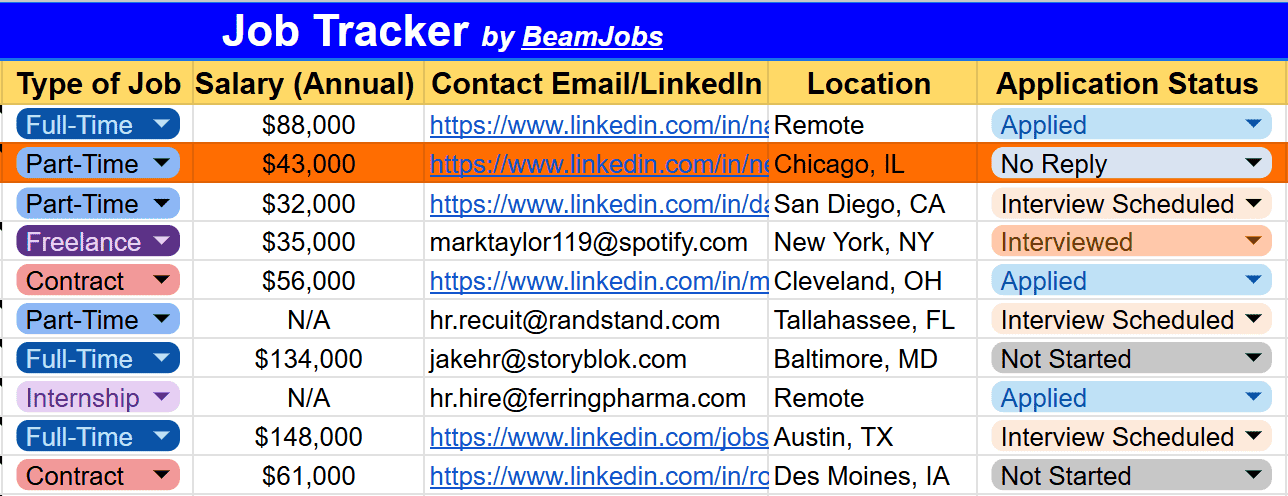
- Decide and set up columns: Include company name, role title, position, job title, status, contact info, date applied, deadline, and job description. Consider using dropdown menus for status or application stage to keep your data organized.
- Add formatting: Use date-pickers, color coding, and dropdown menus to highlight specific columns and maintain consistency.
- Use sort and filter: Organize columns with sort and filter features to instantly view where applications stand. For example, setting up a separate view will let you track all companies with which you’ve scheduled an interview.
- Set up reminders: Integrate your Google Sheets calendar to set up reminders or use formulas to highlight job applications that require follow-up.
To start tracking your applications, begin by entering the job description and other key details for each position you apply to.

Which essential columns should you include in a job search tracker template?
While creating a job search tracker template, there are two columns you must build: essential and optional columns. The essential ones are:
- Company name
- Job title
- Job link
- Salary
- Contact ID/email/LinkedIn
- Status
- Date applied
- Deadline
If needed, you can include optional columns that are nice-to-haves but not strictly necessary, like:
- Employment type (contract, part-time, etc)
- Location
- Interview stage
- Notes (for recording important details or reminders)
- Interested (to mark roles you are interested in)
- Good match (to indicate positions that align well with your preferences)
How do I track a job and interview dates in Google Sheets?
Once created/downloaded, you need to start entering your job search details and fill out all the columns accordingly. Our job tracking template, in particular, supports a few automations and displays the days left to apply as per the set deadline.
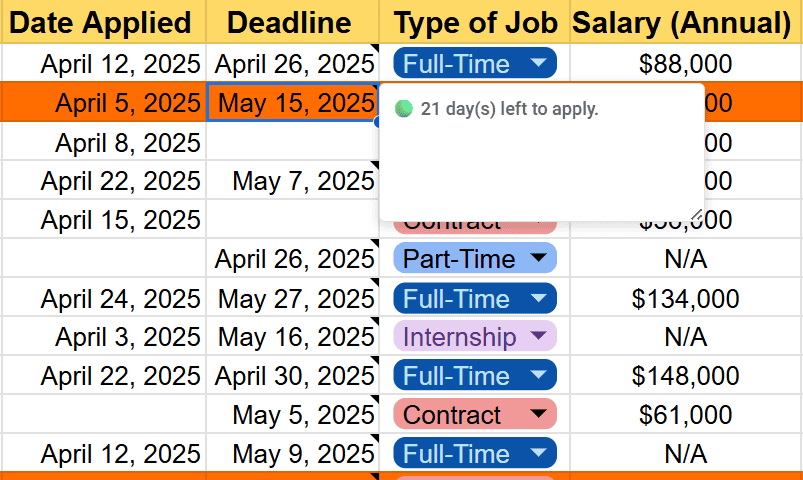
Once created/downloaded, you need to start entering your job search details and fill out all the columns accordingly. Our job tracking template helps you monitor active applications throughout the application process, ensuring you stay organized and never miss a step.
You can track job applications at every stage, including recording interview dates and interview time, and set follow up reminders to prompt you when it’s time to send a follow up email. Tracking these details allows you to analyze your success rates and identify patterns in your application process for continuous improvement.
If you switch a job’s status to “Interview Scheduled” and choose a date within two days, your notes column will automatically remind you. Further, the sheet displays a daily update, listing all jobs that haven’t responded to your application for over a week.
Pro Tip: Tracking the date you applied for a job is crucial for determining when to follow up; if you haven’t heard back within a week or two, it’s time to send a polite nudge email.
Google Sheets are Limited for Tracking Your Job Search
Here’s the truth: Google Sheets works—until it doesn’t. As good as Google Sheets may be, it was never built for job seekers.
Once enough columns are piled up, your application tracking sheet can easily become disorganized. Long columns of data, poor mobile usability, and limited visualizations will make your job hunt more life-draining. Sheets is not like your personal VA and requires manual updates.
The Best Way to Track Your Job Search
Finding a job is like a full-time job in itself. However, proper tools can help you stay organized and sane. Platforms like Teal and Huntr are solid options for tracking applications, but fall short when it comes to customization, visuals, and resume-building tools, according to this resume builder comparison.
That’s where BeamJobs comes in. Our goal is simple: Help professionals create resumes that work. From a robust resume builder and job tracking template to generating job-specific cover letters, we’ve bundled everything you need into one platform to help you land your new position.
The Graduate Resource Pack is filled with tools for anyone launching or rebooting their career. It includes an efficient job tracking template, real-world resume examples that are landing jobs in 2026, and practical tips to help you stand out regardless of whether you’re fresh out of college or simply ready for a fresh start.
With AI-powered features like automated bullet-point generation and personalized resume feedback, we make it easy to track your job applications and tailor resumes so well that employers can’t resist them.
Other Google Sheets Job Application Tracker Templates
- The Muse: The Muse has a simple yet effective tracking sheet that divides your journey into three chronological stages: general information, pre-interview, and interview.
- FileDrop: This job tracker is a basic sheet with color-coded columns that help you store primary data like job title, company name, date applied, etc.
- Spreadsheetpoint: The Spreadsheet Point job tracker is divided into three separate sheets and lets you organize your job hunt details according to your progress, making it easy to tailor the tracker to your own job search needs.
Job Application Tracker for Google Sheets FAQs

To make a job tracking document, open Google Sheets and create a blank sheet. Label important columns to track each stage of the application process, such as application submitted, interview scheduled, offer received, and so on. Apply appropriate formatting to each one, and use filters or conditional formatting to make job sorting easier.
In Google Sheets, you’ll have to enter your job applications as you go along and manually track any changes. Use our job application tracker template provided above.
You can also use the tracker to record contact info for hiring managers, helping you personalize your applications and follow up effectively. You’ll get automated nudges on jobs requiring your attention and separate views for filtering, eliminating manual effort for job tracking.
The best way to organize your job search is to set a clear schedule, such as following up after one week of applying, using the BeamJobs job application tracker.
A follow-up email sent 7-10 days after applying can demonstrate persistence and may reignite a stalled application, increasing the chances of a response from recruiters.

Stephen is the co-founder and CEO of BeamJobs. Frustrated with the challenges he'd faced in his own job search, he left the corporate world to start BeamJobs with his brother. Drawing on firsthand experience with hiring and getting hired as technical talent, he started BeamJobs in 2020 to help qualified job seekers land interviews with less stress. Since then, more than 4 million people have built their resumes and cover letters on BeamJobs. Stephen's insights have been featured in notable outlets, such as Fast Company, Business Insider, Yahoo Finance, MIT, and Zapier. Learn more about Stephen.

